
Project Role: Lead UX/UI Designer & Front-End Engineer
Organization: Palm Beach County Public Affairs
Timeline: mid 2024 and early 2025
Tools Used: ArcGIS JavaScript APIs, HTML/CSS/JS, Looker Studio, Agile Methodology
Overview
This was one of my final major projects with Palm Beach County before relocating to Virginia in 2025. I aimed to leave behind a product with lasting impact—a modern, user-centered web app that consolidated essential, location-based public data into a single, accessible dashboard.
The project began with a request from the Public Affairs department to modernize their outdated commission district locator, which was previously just a basic ArcGIS map offering minimal information: a user’s commission district and commissioner.
Identifying Broader Opportunities
During early stakeholder discussions, it became clear that we could extend the value of this application far beyond the original scope. In addition to listing local commissioners, stakeholders saw potential to include federal and state representatives, emergency service zones, evacuation routes, flood zones, and more—data that previously lived in multiple disconnected apps.
After competitive analysis and review of similar municipal dashboards, we determined the goal: design a single digital destination where residents could enter their address and instantly view all relevant local, state, and infrastructure information in one place.
UX and Technical Planning
I took ownership of both the UX strategy and front-end engineering—a necessity in this context due to limited internal design resources. I partnered closely with the PBC GIS department to identify and access the required data via ArcGIS JavaScript REST APIs. We prioritized ease of maintenance and scalability, ensuring that most updates would require minimal engineering effort.
Key planning activities included:
- Mapping user flows and MVP functionality based on resident needs
- Designing the data architecture and search logic
- Verifying feasibility of integrating 12–15 GIS data sources via API
- Creating an address autocomplete system to streamline the search experience
Prototype Development
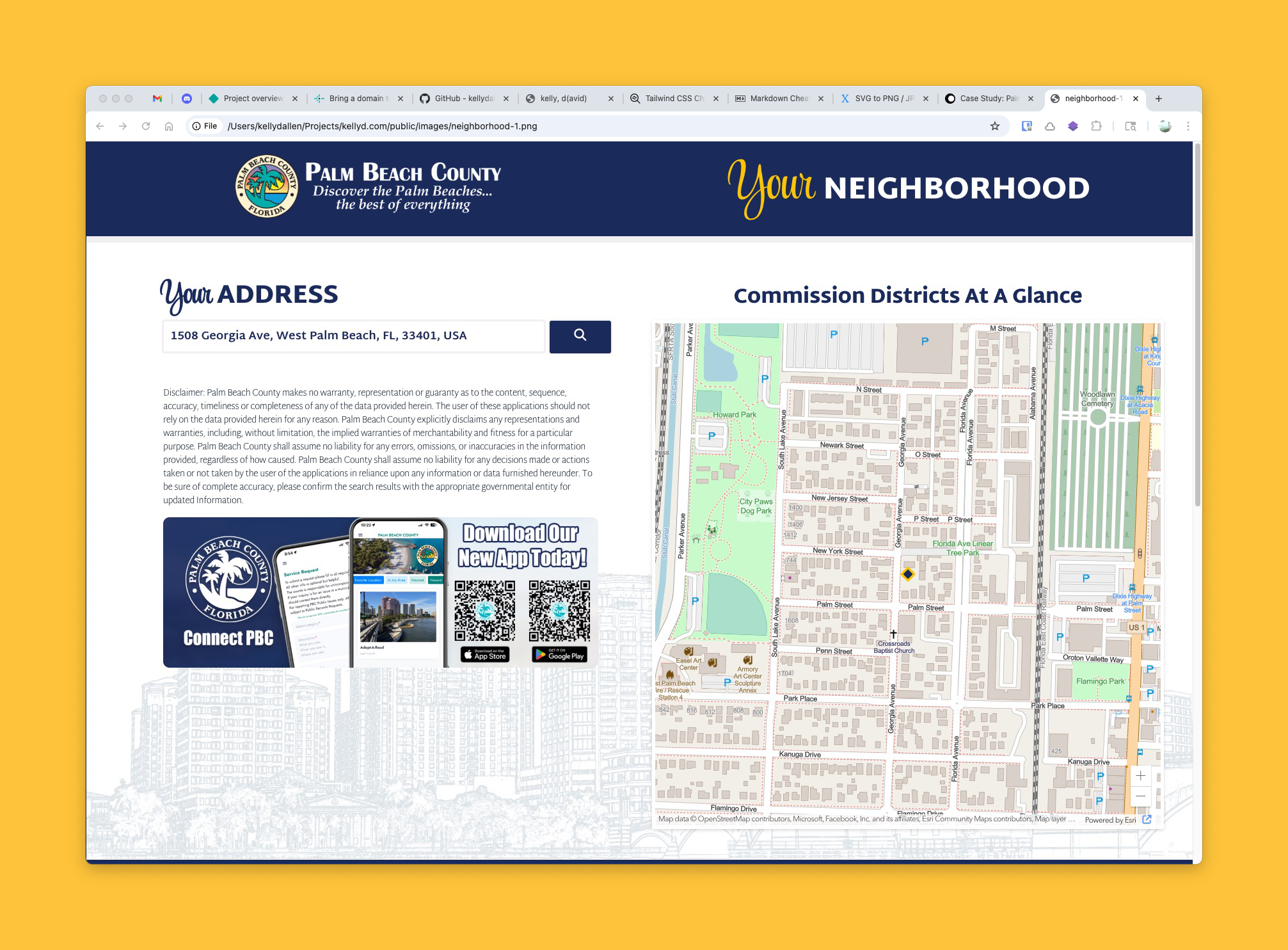
Rather than starting with static mockups, I designed directly in code, building an early working prototype to validate the core concept and identify any technical blockers early. This iterative, “design-in-code” approach allowed us to test data connections, page behaviors, and preliminary UI layouts at the same time.
The initial interface featured:
- A prominent address entry field with autocomplete
- An interactive map for orientation
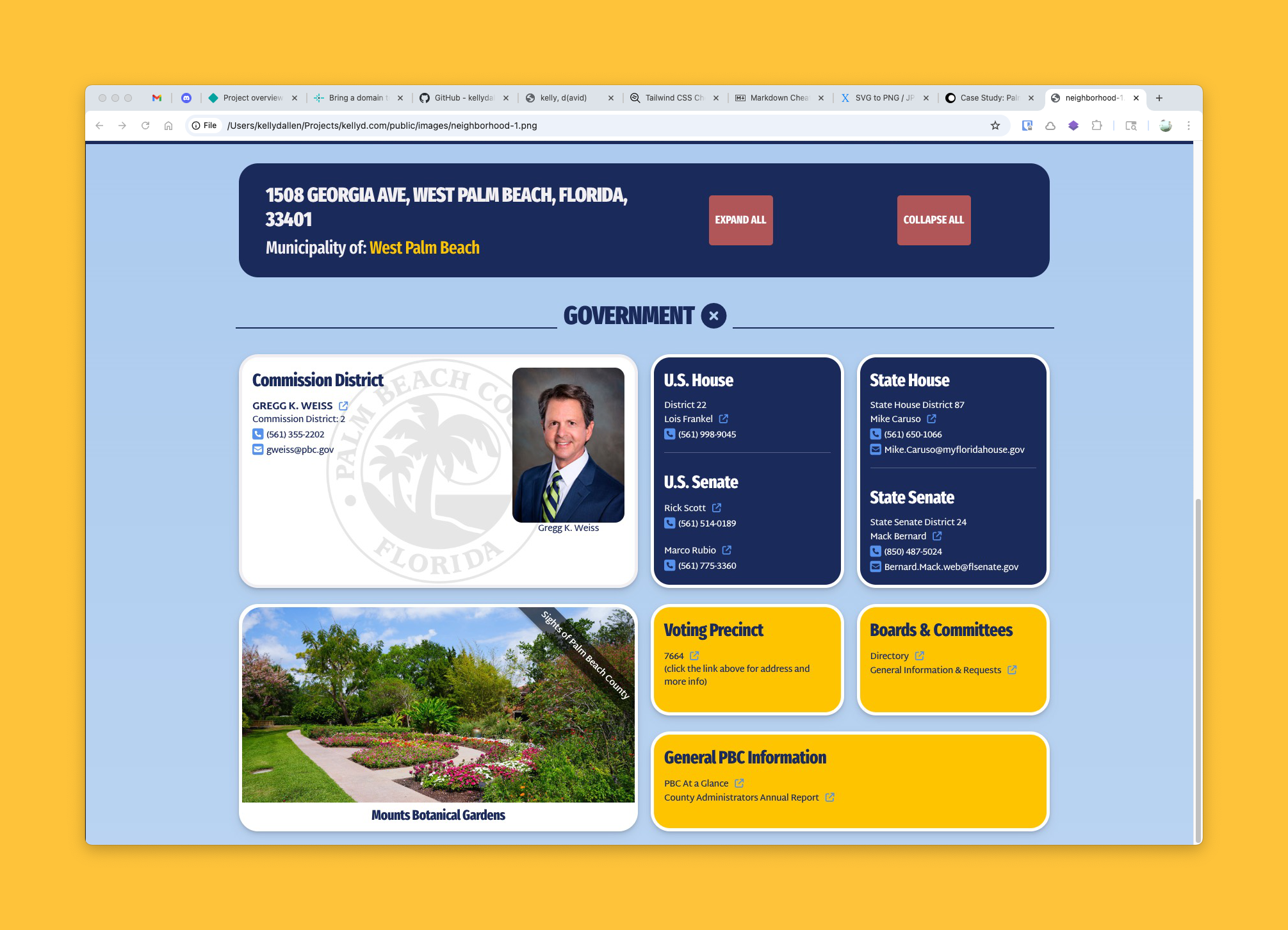
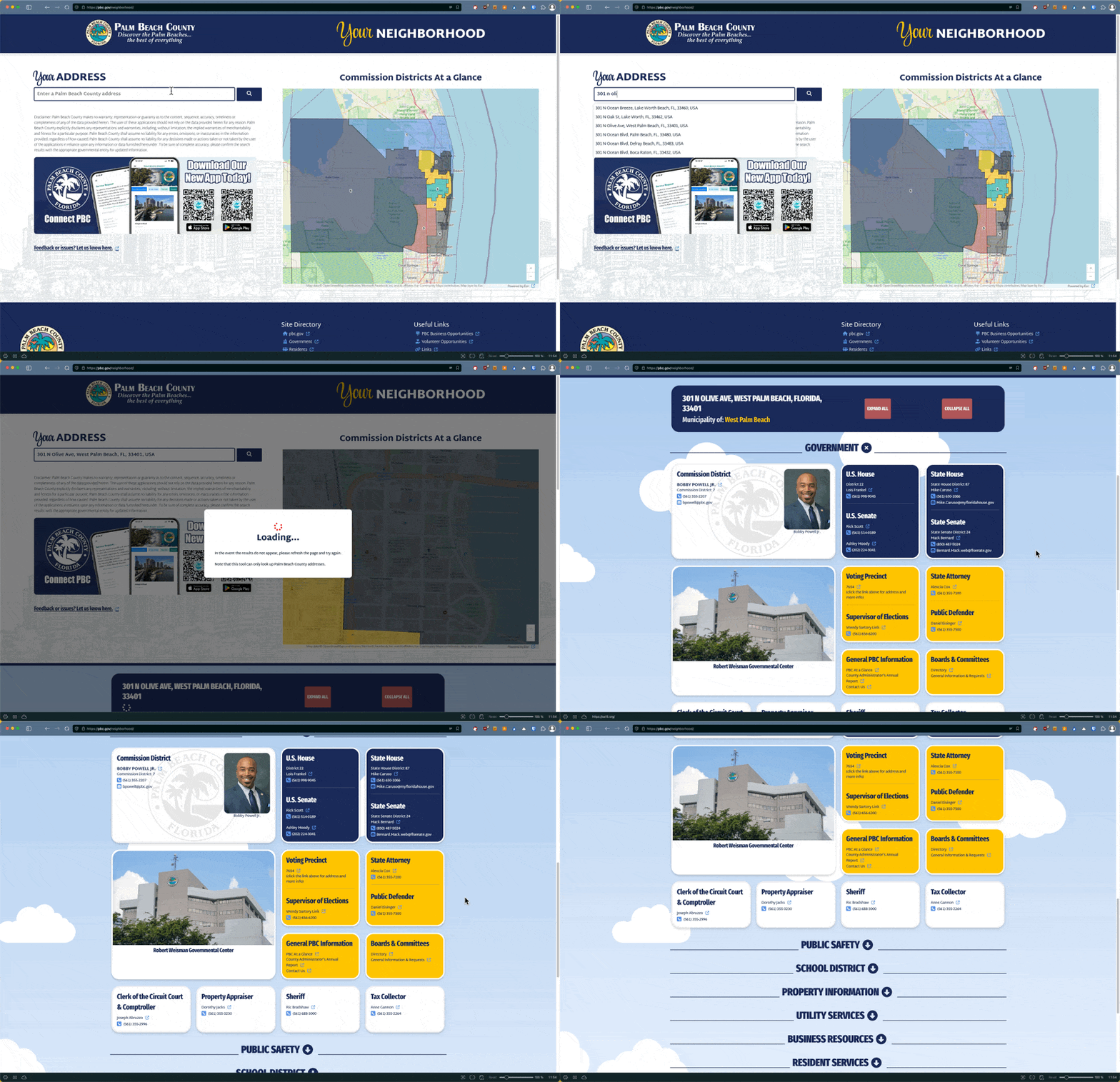
- Auto-scrolling and categorized results once a valid address is submitted
To streamline content without overwhelming users, I organized results into expandable accordion sections such as “Government,” “Public Safety,” and “Transportation,” with the most relevant info—local government—automatically expanded by default.
Stakeholder Engagement & Iterative Improvement
Throughout development, I maintained weekly check-ins with the Public Affairs team and adopted an Agile-inspired methodology—short sprints, continuous testing, and feedback-driven iteration. As more stakeholders viewed the prototype, additional use cases and features emerged.
Notably:
- I added a live traffic camera map, leveraging my earlier work setting up countywide traffic feeds. Now, residents could view real-time traffic conditions via interactive map markers.
- I collaborated with the team on promotional integrations, including app download CTAs and location-based banner imagery.
One major turning point came during our presentation to the County Administrator. While the core functionality was praised, the design was considered “too plain.” I proposed a more engaging visual style using CSS Grid in a responsive masonry layout, along with dynamic regional imagery and subtle animated SVG elements (like drifting clouds) to bring a touch of personality without compromising usability.
Refinement & Finalization
As the app neared production, we continued polishing functional details:
- Replaced our generic autocomplete with a revised geofenced query that limited suggestions strictly to addresses within Palm Beach County
- Finalized responsive styles for accessibility and mobile performance
- Integrated Google Looker Studio to set up performance dashboards, sending automated usage reports to stakeholders
To ensure long-term sustainability, I:
- Designed the system to rely on live-updating GIS data (minimal manual maintenance)
- Set up editable text files for city and elected official info so non-technical users could make updates without developer support
- Conducted and recorded a detailed training session for the incoming technical staff
Impact & Outcomes
The app now provides a seamless, informative, and ADA-compliant experience that transforms how Palm Beach County residents interact with local data. It consolidates critical services and public awareness tools into one modern, intuitive platform.
Highlights:
- Automatic, comprehensive local data lookup via a single address search
- Cross-departmental data integration (government, safety, traffic, emergency management)
- Easy post-launch maintenance with minimal developer intervention
- Scalable, responsive, visually engaging design system
The project has received internal praise from multiple departments, and I anticipate it being recognized with design and civic tech awards in the near future.
Key Skills Demonstrated
- Full lifecycle UX and UI design
- Front-end development (HTML, CSS Grid, JavaScript)
- API integration with ArcGIS REST services
- Agile, cross-functional collaboration
- Accessibility and mobile-first responsive design
- Data visualization and reporting setup (Looker Studio)
Want to experience it firsthand?
URL: Palm Beach County Neighborhood Dashboard
You will need to test with Palm Beach County addresses. Here are a couple:
- 1100 S. Ocean Blvd, Palm Beach, FL
- 301 N. Olive Ave, West Palm Beach, FL
(note of course that it may change in the future since I have moved on. A quick video overview is below.)